New · Windows appComing soon

Loop Miner

Dig through every sample. Keep the good bits.

A fast sample digger for Windows. Audition huge libraries, mark as many loops and snippets in each file as you like, chop breaks on the pads like an MPC, and keep a record of where every sample came from.

V1.2 · WINDOWS 10 / 11, 64-BIT · FREE 14-DAY TRIAL AT LAUNCH

  1. 01Lazy chopPlay the record and tap the pads on every hit.
  2. 02Auto drum sortKicks, snares and hats named and filed for you.
  3. 03Source listCredits and sample clearance, kept as you work.
  4. 04Export as a kitAbleton Drum Rack, MPC, SP-404 or a folder of WAVs.
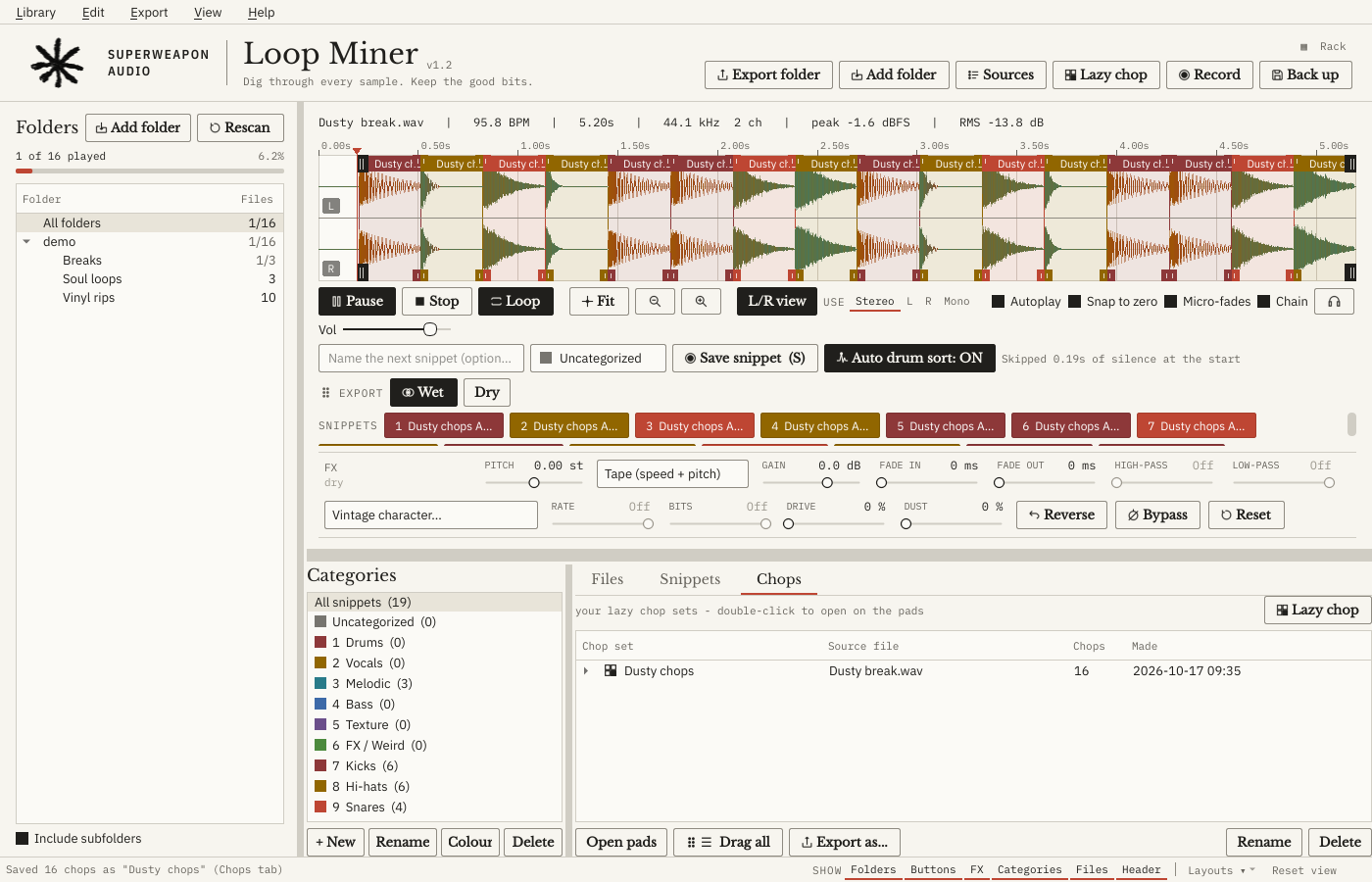
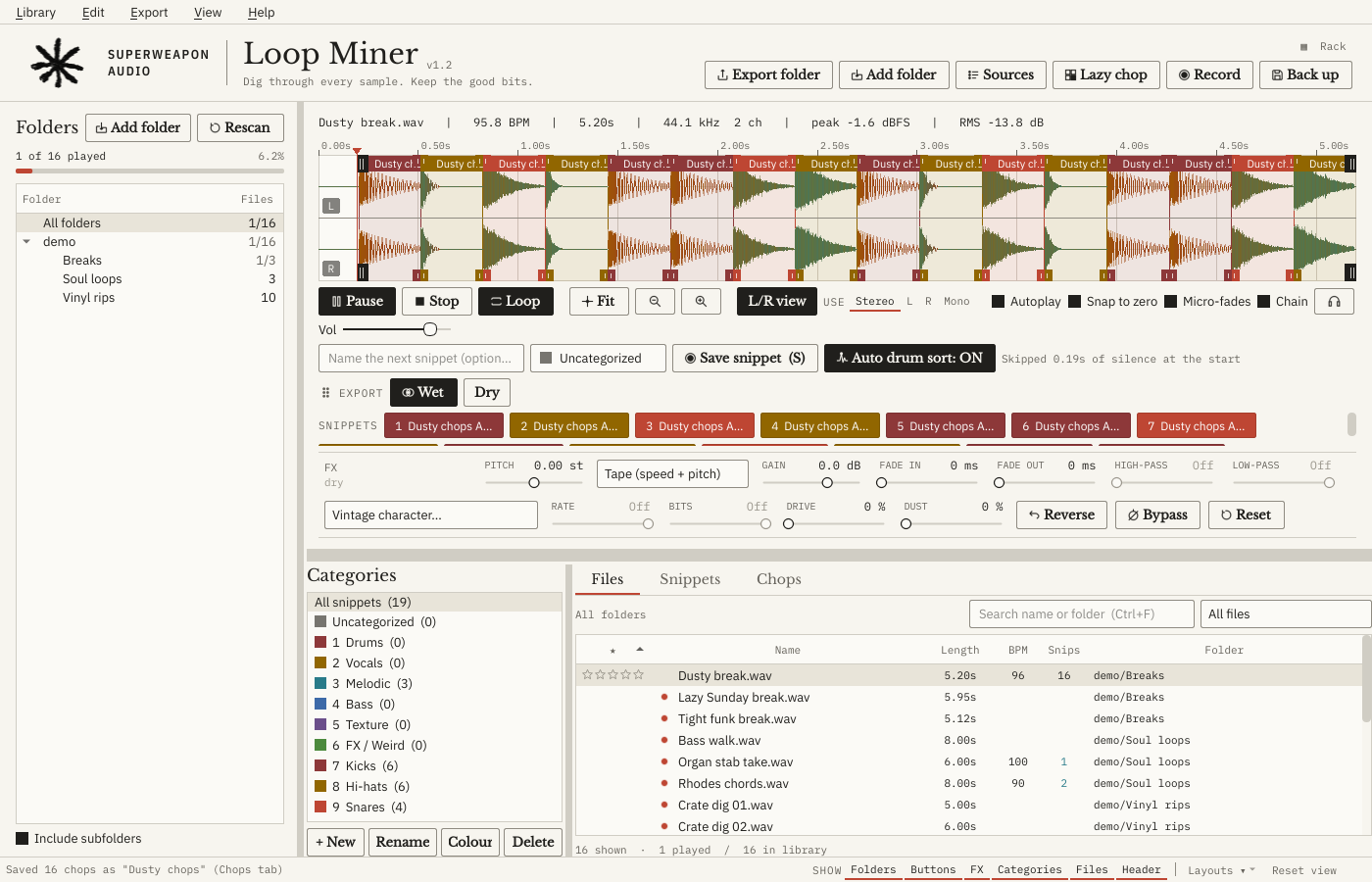
Loop Miner's main window in its Light look: a drum break chopped into sixteen coloured regions, snippet buttons, the FX row, and Kicks, Snares and Hi-hats categories filled by Auto drum sort
Loop Miner 1.2, Light look. A break chopped into 16, filed as Kicks, Snares and Hi-hats by Auto drum sort.Screenshot from the app
Made for people who sample records

Every bit of the record, yours to take

Loop Miner treats a record the way you do: one take full of moments. Mark them all, hear each side on its own, give them the grit of the samplers they were made for, and keep a note of where each one came from.

01

As many slice points as you like

Mark every moment in a file: the intro chord, the stab, the turnaround, the bass note. Each one gets a name, a colour and its own button. Click to hear it, drag it straight into your DAW, or press 1 to 9 to file it.

  • Ctrl + drag a slice to slide it along the record at the same length, hunting the sweet spot
  • Alt + Left / Right jumps the loop by its own length, bar after bar
  • Shift + Up / Down doubles or halves it
  • Every slice keeps its own pitch, filters and grit
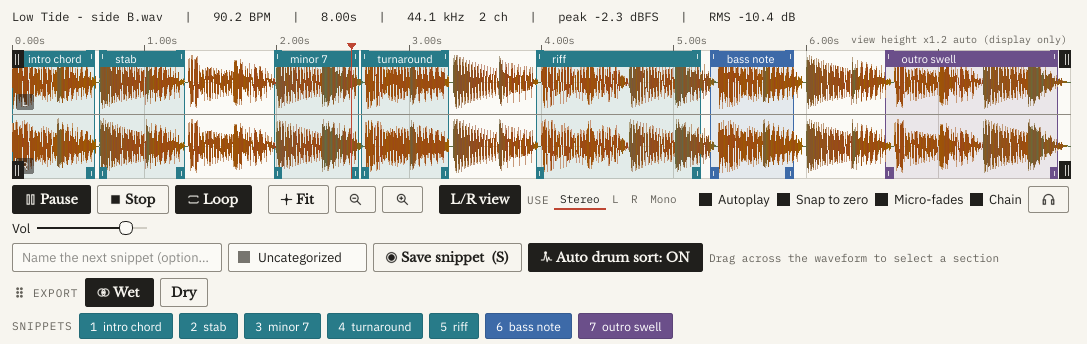
One eight-second file with seven named slices across the waveform: intro chord, stab, minor 7, turnaround, riff, bass note and outro swell, each with its own coloured button underneath
Seven slices in one file, each with its own button.
02

Left and right, sliced apart

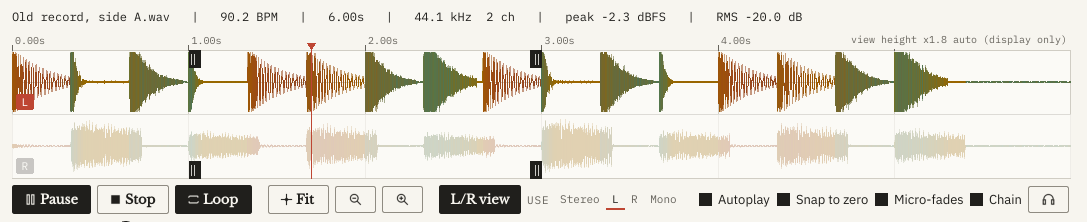
Old records often hide different parts on each side: drums hard left, horns hard right. Loop Miner shows the left and right as two lanes. Pick L or R, and you hear and slice only that side. It exports as a clean mono file marked [L] or [R].

Stereo view: the left lane bright and selected, the right lane dimmed
Left side picked, right side out of the way.
03

Classic sampler grit, heard live

Run a slice through the sound of the machines that made sampling: lower sample rates, fewer bits, drive and dust. You hear it as it plays, and drag it out wet or dry.

12-bit 26 kHz12-bit 40 kHz12-bit 32 kHz16-bit 44.1 kHz8-bit 27 kHz8-bit 16 kHzLo-fi tapeDusty vinylTelephoneCrushed
The FX row with the 12-bit 26 kHz preset: rate 26.04 kHz, 12 bit, drive 18 per cent
The 12-bit, 26 kHz setting on a slice.
04

Pitch it like a turntable

Tape mode changes speed and pitch together, like slowing the platter. Or keep the tempo and only move the pitch.

05

Record straight from vinyl

Plug in a turntable and press Record. It can start when the needle drops, puts each take in its own lane, and keeps listening for the next one.

06

Chop it like an MPC

Tap 16 pads on every hit, or let Auto chop find them. Auto drum sort names each hit and files it.

07

Every sample, credited

The source list remembers the record, the artist and the exact seconds behind every sample you use. Ready when it's time to clear it.

01 · Lazy chop

Chop it like an MPC

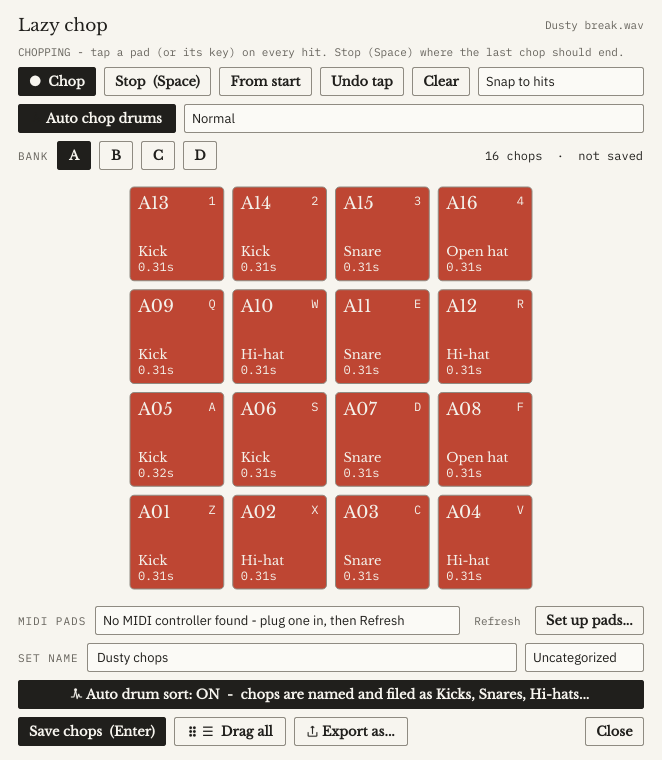
Play the record and tap the pads on every hit. Each tap makes a chop, snapped to the start of the hit even if you’re a little late. Then finger-drum your chops straight away.

  • 16 big pads in four banks, up to 64 chops
  • Mouse, keyboard (laid out like an MPC) or any MIDI pad controller
  • Snap to hits, undo a tap, start again from the top
  • Chop sets are saved like folders
The Lazy chop window: 16 pads lit with chops named Kick, Snare, Hi-hat and Open hat, plus Auto chop drums and Snap to hits
Lazy chop, bank A: sixteen chops, each named by Auto drum sort.
02 · Auto chop and Auto drum sort

One click finds every hit

Auto chop drums finds every hit in a break and chops it: main hits only, or ghost notes too.

Auto drum sort listens to each hit you save and hears what it is: kick, 808, snare, clap, hi-hat, cymbal, tom or percussion. It names it and files it in its own folder. One button turns it on or off.

Loop Miner with a break chopped into sixteen regions and the Chops tab listing the chop set
Sixteen chops, with the chop set in the Chops tab.
03 · Source list

Know where every sample came from

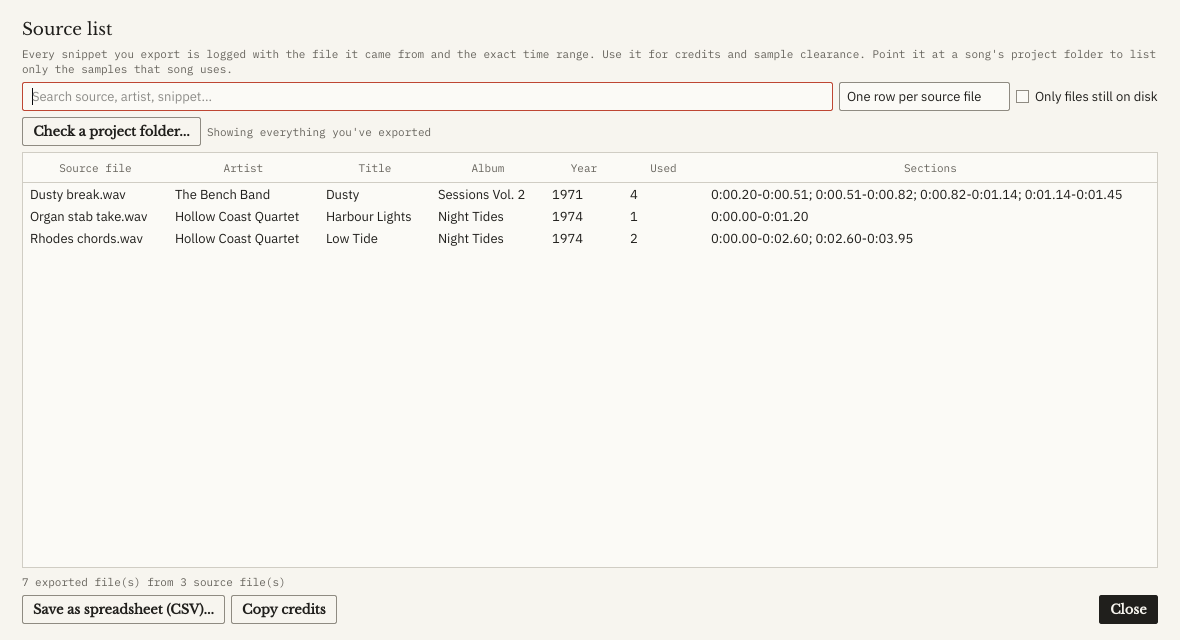
Every snippet you export is logged with its source file, the exact time range, and the source’s artist, title, album and year tags. A source note is also written inside each exported WAV.

Point Check a project folder at a song and it lists only the samples that song uses, even files you renamed in your DAW. Save it as a spreadsheet or copy a credits list.

The Source list window: each source file with its artist, title, album, year, how many snippets were used and their time ranges, plus Save as spreadsheet and Copy credits
Source list, ready for credits and sample clearance. Demo files with made-up tags.
04 · Export as a kit

From chops to a playable kit

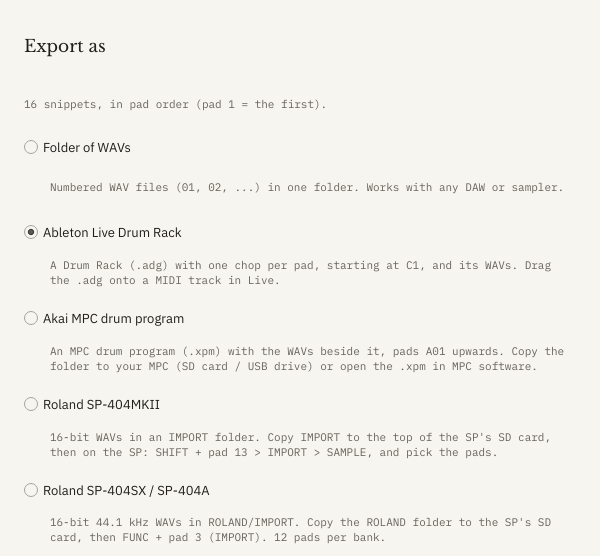
One click turns a chop set into a kit for the gear you use, in pad order. Or drag them all into any DAW.

Ableton Live Drum RackAkai MPC drum programRoland SP-404MKIIRoland SP-404SX / SP-404AFolder of WAVs

Hit your MIDI pads once to match them to the screen. Loop Miner remembers each controller, and you can share the layout as a file.

The Export as window with Ableton Live Drum Rack picked, and Akai MPC, SP-404MKII, SP-404SX and a folder of WAVs as the other choices
Export as: pick the kit format for your gear.
05 · Three looks

Light, Dark or Rack

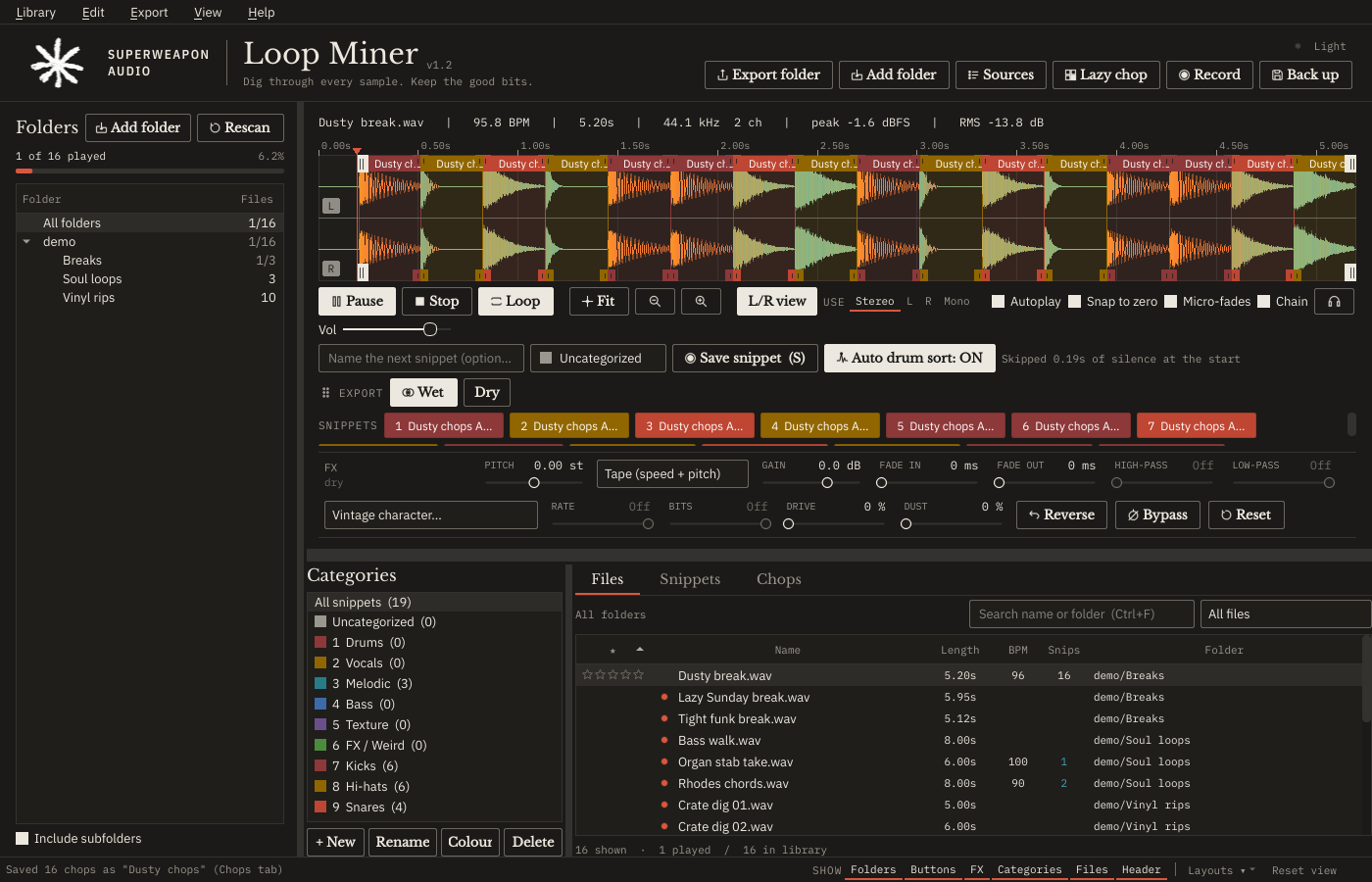
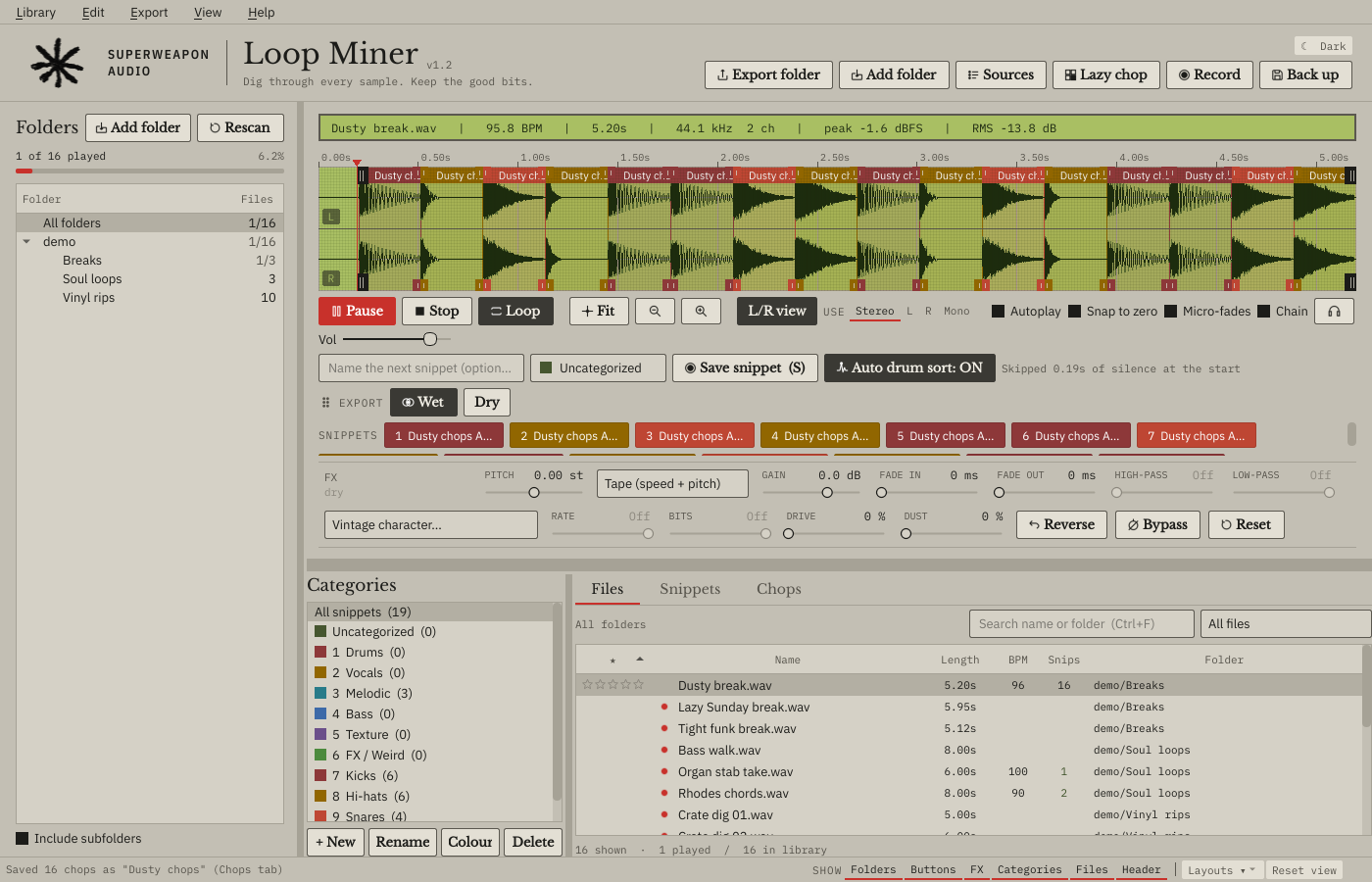
Light is the everyday look. Dark is easy on the eyes for long nights, and Rack is a late-80s rack sampler with the waveform on a backlit green LCD. Switch with one click or Ctrl+T. Fifteen waveform colour palettes, or make your own.

Loop Miner in its Dark look
Dark
Loop Miner in its Rack look, with the waveform on a green LCD
Rack
Everything else

Made for long digging sessions

Built for big libraries
Made for 100,000+ files. Search as you type, 1–5 star ratings, unplayed markers, progress for each folder and the whole library, a BPM column and bpm: search.
Your work travels
Snippets and categories stay with your sample folders, even on a new PC or a new drive letter. One-click backups to Google Drive or any folder.
Get Loop Miner

Sign up for early access

Loop Miner 1.2 is in its final tests. Price and release date are on the way. Sign up and we’ll email you the day it’s out, and you can ask to test it first.

Be the first to hear, and the first to try it

Runs on
Windows 10 or 11, 64-bit.
Licence
Use it on up to 3 computers. Activate once in your browser (or offline with a file), then it works offline. No internet needed to start it.
Try it first
A free 14-day trial at launch.
First install
The installer isn’t code-signed, so the first time Windows may say “Windows protected your PC”. Click More info → Run anyway. The download page lists the installer’s SHA-256 fingerprint so you can check it.
Support
hello@superweaponaudio.com. Loop Miner has Report a problem and a user guide built in.
More from Superweapon Audio

From the same bench